
Nukkad to Nation / How to play
How to play Nukkad to Nation
Nukkad to Nation is a 3D cricket game you play in your browser. Bat, bowl and field yourself in a quick match, take on someone online, build a Star XI from collectible cards, win a World Cup in Tournaments, or start a career with a city club and work your way up as a manager or a player.
- Press Play now on the main menu and you are in a 3D match in one tap. Set up a match chooses the teams, format, ground and pitch.
- Bat with the arrow keys and S, W or D, a controller, or swipes on a phone. Bowl with the pitch marker and the run-up meter.
- Play online against anyone who is free. When nobody is, a bot steps in, and the game tells you it is a bot.
- Collect player cards in Star XI, or play a World Cup or a league in Tournaments.
- For the long game, a manager or player career takes you from a city club to a World Cup.
What is on the main menu?
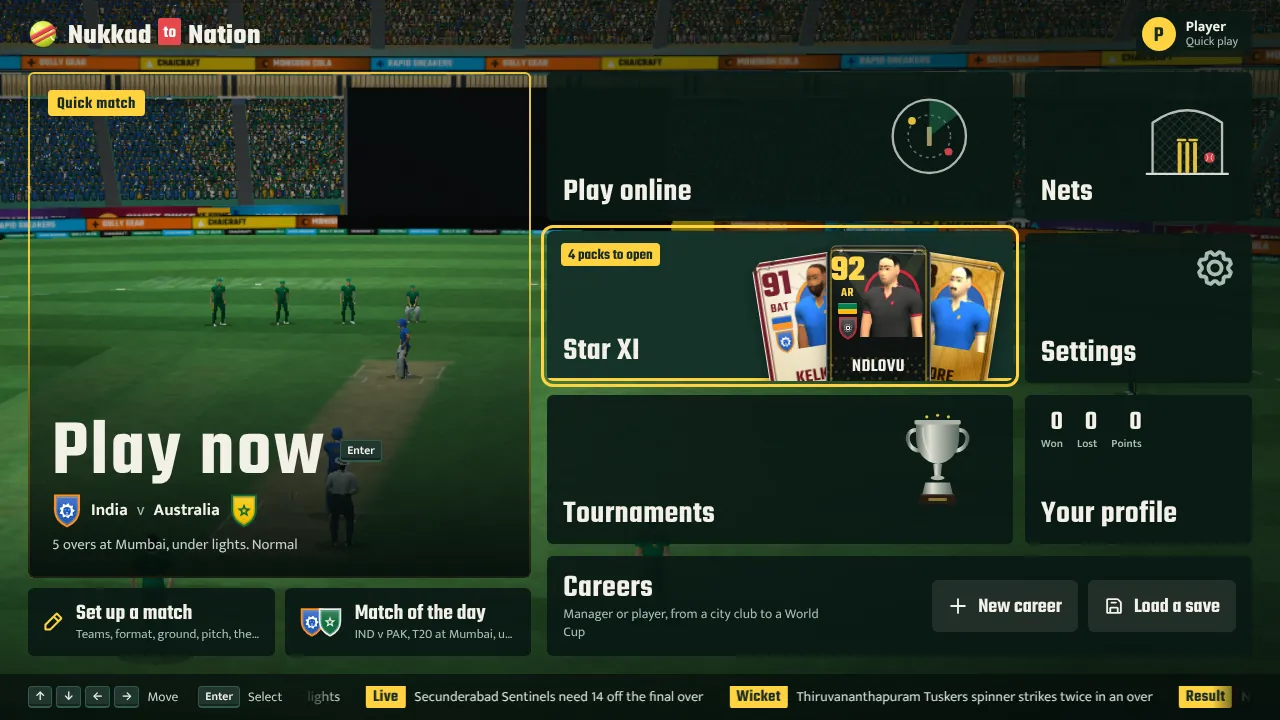
The game opens on the main menu, over a live 3D stadium. Everything is one or two taps away:
- Play now starts a match straight away with the set-up you used last (the first time, India v Australia over 5 overs).
- Set up a match lets you choose everything first. Match of the day is a ready-made fixture that changes daily.
- Play online, Star XI and Tournaments are the other ways to play, covered below.
- Nets is practice in 3D that never counts towards anything.
- Careers continues your latest career, starts a new one or loads a save.
- Settings and Your profile hold the graphics, sound and control options, and your record in quick matches.
The menus work with a mouse, touch, the keyboard (arrows to move, Enter to choose, Esc to go back) and a controller (the d-pad, A and B). On every screen the main button sits at the bottom right, or along the bottom on a phone, and says what it will do.
How do I set up a quick match?
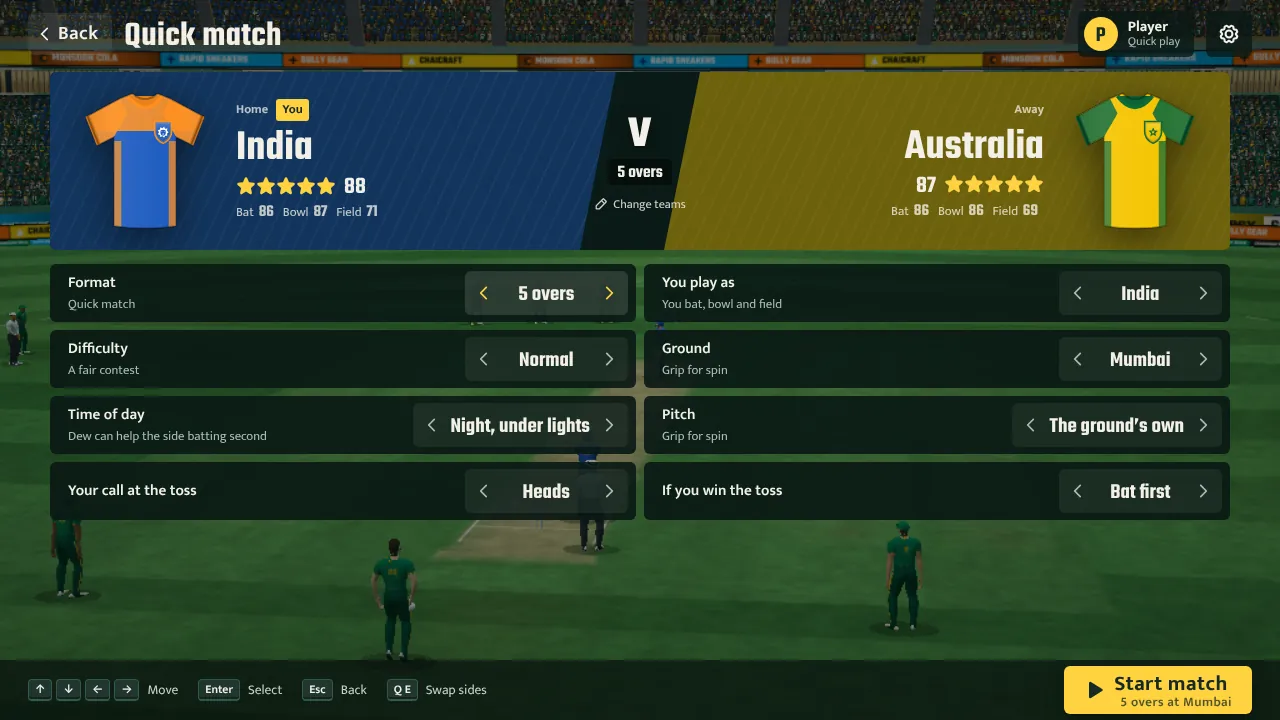
Choose Set up a match. The two sides stand side by side in their kits with their ratings: use the arrows on each side, or Change teams, to pick from 20 national sides, the state and county teams and the franchise sides. Then set:
- Format: 2, 5 or 10 overs, a T20, a one-day international, a Test, or any number of overs you like.
- Difficulty: Easy, Normal, Hard or Pro. It sets how forgiving the timing is.
- You play as: either side. You bat, bowl and field for the whole team.
- Ground, time of day and pitch: the home side's grounds, day or night under lights, and the pitch: the ground's own, a green seamer, a flat road or a dusty turner.
- The toss: your call, and whether you bat or bowl if you win it.
Press Start match. After the last ball you get the full-time screen with both scorecards and the player of the match, and Rematch plays the same teams again with a new toss.
How do I play a match in 3D?
Quick matches, online games, Star XI and tournament matches are all played in 3D, with the camera behind the bowler like a TV broadcast. A match opens with a short build-up: a flyover of the ground, the toss in the middle with the two captains, the pitch report, the line-ups and the openers walking out. Press Space, tap or press A to skip it. In a career, press Play in the middle on the live match screen or before the toss. As a manager you bat, bowl and field for your whole team. In player mode you take over whenever your cricketer is on strike, bowling or under a catch, and the rest plays itself (you can choose to watch it).
The keyboard works like the classic PC cricket games, so it feels familiar from the first ball:
| When | Keys |
|---|---|
| Batting | Hold the arrows for the direction (↓ straight, ← and → for the off and leg side, ↑ behind square), then press S on the front foot, W on the back foot or D down the track as the ball arrives. With no arrow it is a block. Hold Shift to loft it. A leaves the ball. |
| Some strokes | S+↓← cover drive, S+→ flick, S+↑→ sweep, W+← cut, W+→ pull, Shift+S+↓ straight six, Shift+W+↑→ hook. |
| Running | D to run (press again for another), A to send your partner back, W to dive for the crease. The light shows how safe the next run is. |
| Bowling | Move the marker on the pitch with the arrows (Shift for fine steps), then press the key of the ball you want (S, D, A, W, or with Shift) to run in. Press it again with the needle in the green: the further along, the quicker and the less accurate. Past the red line is a no-ball. O switches over or around the wicket. |
| Fielding | S to catch when the ring closes on the ball. With the ball in hand, S throws to the keeper and W to the bowler; hold Shift to throw hard. |
| Reviews | When an LBW decision goes against you, R sends it to ball tracking. |
| Other | C camera, F set the field before a ball, M sound, Esc pause, where you can change the difficulty, the commentary and replays, or let the game play the over. |
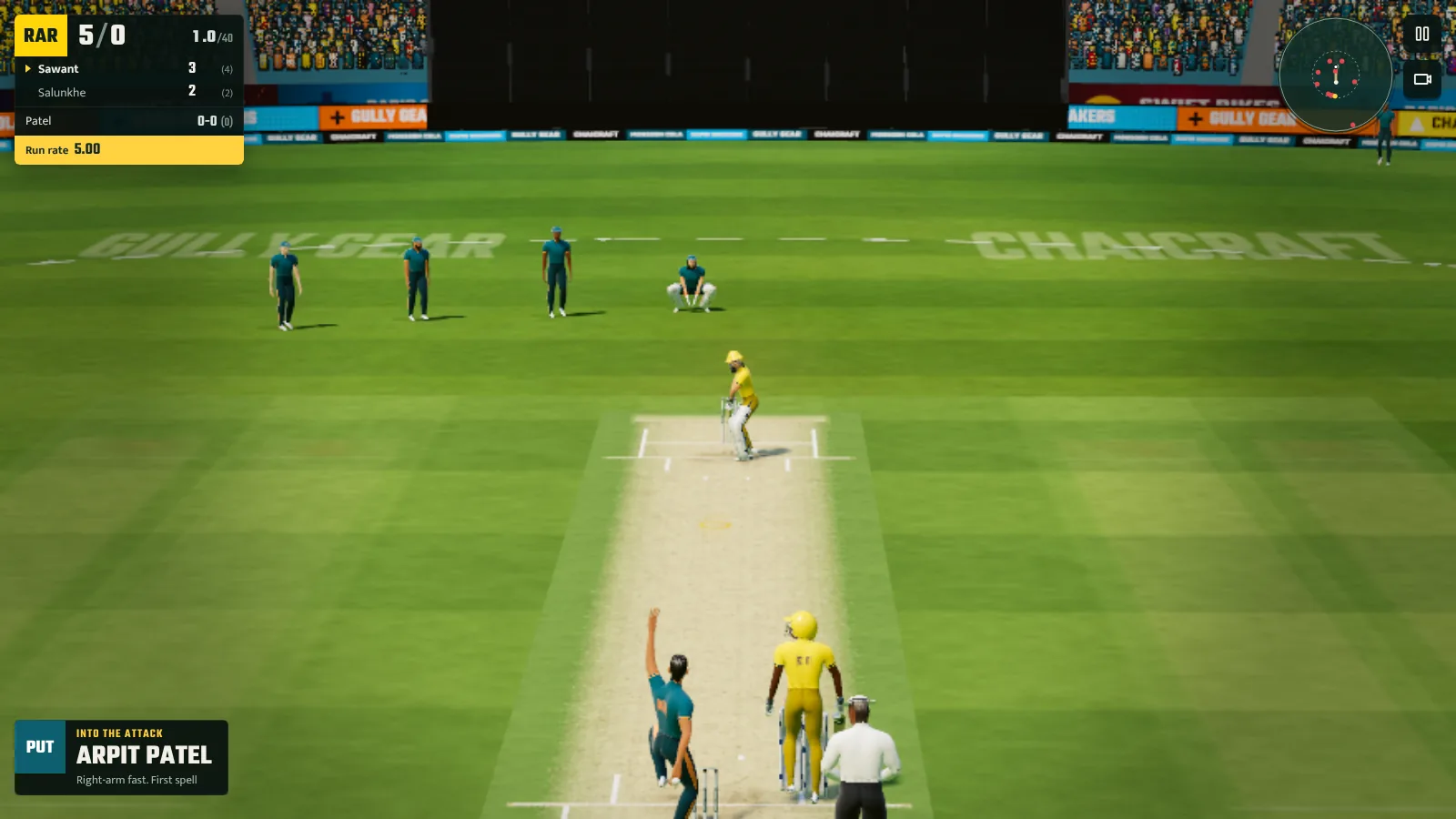
Timing is everything: a shot played just as the ball reaches the bat flies off the middle, early or late shots go squarer or finer, and late swing or seam can find the edge. Short balls want the back foot, full balls the front foot, and charging a spinner kills the turn, though a good spinner will see you coming. The difficulty in the pause menu sets how wide the timing window is, from Easy to Pro.
Can I play with a controller or on a phone?
Yes. Plug in an Xbox or PlayStation controller and it works straight away, with the on-screen hints switching to its buttons. Batting works like the classic console cricket games: the left stick picks the front or back foot or shuffles you across, and you flick the right stick the way you want to hit the ball. When you flick is your timing and how far you push it is the power. Hold one trigger to loft it and the other to come down the track. You can bowl, run and field with the controller too.
On a phone, turn it sideways and swipe the way you want to hit: down the screen is straight, a longer swipe hits harder, a tap blocks and leaving it alone leaves the ball. Hold Loft, or put a second finger down, to hit it in the air. To bowl, drag anywhere to move the marker, tap Run in, then tap Release in the green. If you prefer buttons, switch Touch style to Buttons in the pause menu.
Is there a practice mode?
Yes, the nets. Open Nets in 3D from the title screen, or the nets card on the Tactics and Training pages (the Me page in player mode). Choose to bat or bowl. When you bat, pick the kind of bowler (fast, swing, seam, off-spin, leg-spin or left-arm) and what to work on, such as short balls, yorkers or spin, and face as many balls as you like. A panel counts the balls you middled, edged and missed, the runs it would have been worth and how good your timing was, with a tip after each mistake. Nothing in the nets counts towards your career. The first time you play in 3D, a coach walks you through batting, running, bowling and catching one step at a time.
Can I set my own field?
Yes. Press F before a ball, or choose Set the field in the pause menu or on the card at the end of an over. Pick one of the named fields (new-ball attack, spin attack, powerplay, death overs, a leg-side trap and more) or drag fielders yourself. They snap to the real positions, and the editor shows the fielding restrictions as you go, so you cannot use a field that breaks them. Your fields are saved with your career for each team and format. The other captain changes his field too, by the phase of the game, the bowler and the batter.
What do the replays and commentary show?
Wickets, boundaries, dropped catches and run outs get a slow-motion replay from two or three angles, including a stump camera. LBW reviews show the ball tracking: where it pitched, where it hit the pad and whether it was going on to hit the stumps. Two commentators call the match, one describing each ball and the other explaining why it worked. Captions are on to start with, and you can turn on the spoken voice, or change the replays to wickets only or off, in the pause menu.
How do I play online?
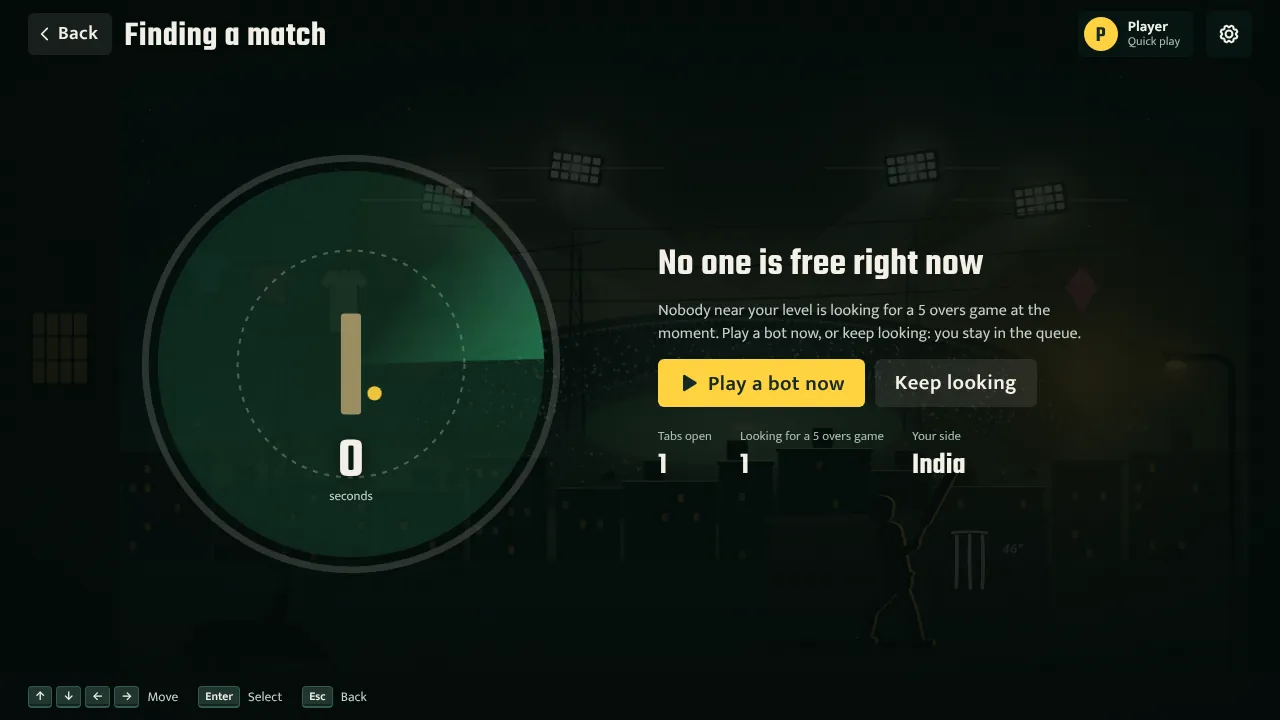
Choose Play online and pick a 5-over or a 10-over game. The game looks for someone who is free and close to your rating, widening the search every few seconds, then shows your opponent, tosses the coin and counts you into the match. If nobody is free, a match against a bot starts after a few seconds; press Keep looking if you would rather wait for a person. Bots are always named as bots and never change your rating. To play a friend, create a room and share its short code.
Each player bats, bowls and fields their own side; online, the fielders take catches by themselves. A light in the corner shows the connection. If your opponent drops out you can wait for them, hand their side to a bot or leave, and they can rejoin while the match is on.
What is Star XI?
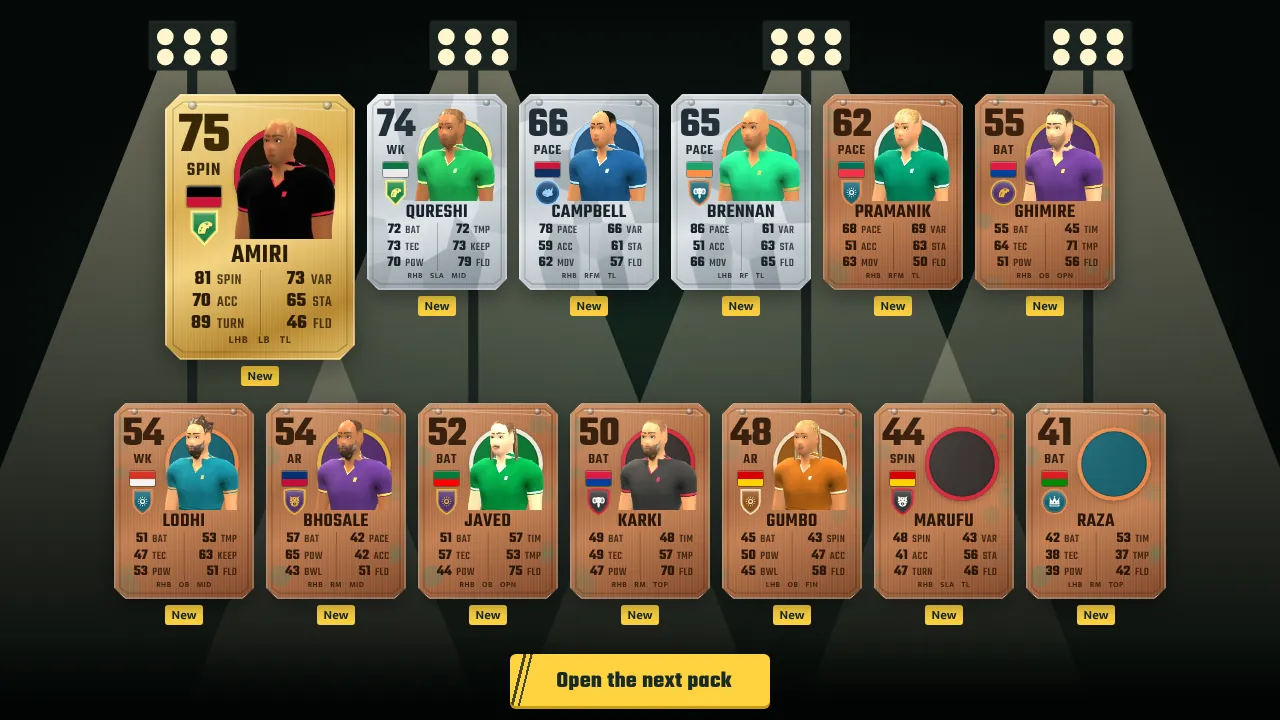
Star XI is the card game: collect players, build the best eleven you can and climb the divisions. You start with a free starter kit and three welcome packs. Cards come in bronze, silver, gold, rare gold and special, with six stats that suit the player's role, and the best pulls walk out in 3D.
- The squad: a batting order with a keeper and at least five bowling options, a captain and a bowling order. Players earn chemistry from team-mates of the same country, state or franchise, and from batting in their natural position, and chemistry lifts how they play.
- Playing: Squad Battles against teams run by the game, Rivals against other players online, and daily, weekly and milestone objectives.
- Coins: earned only by playing, never bought. Spend them on packs or in the market, and sell the cards you do not need.
How do tournaments work?
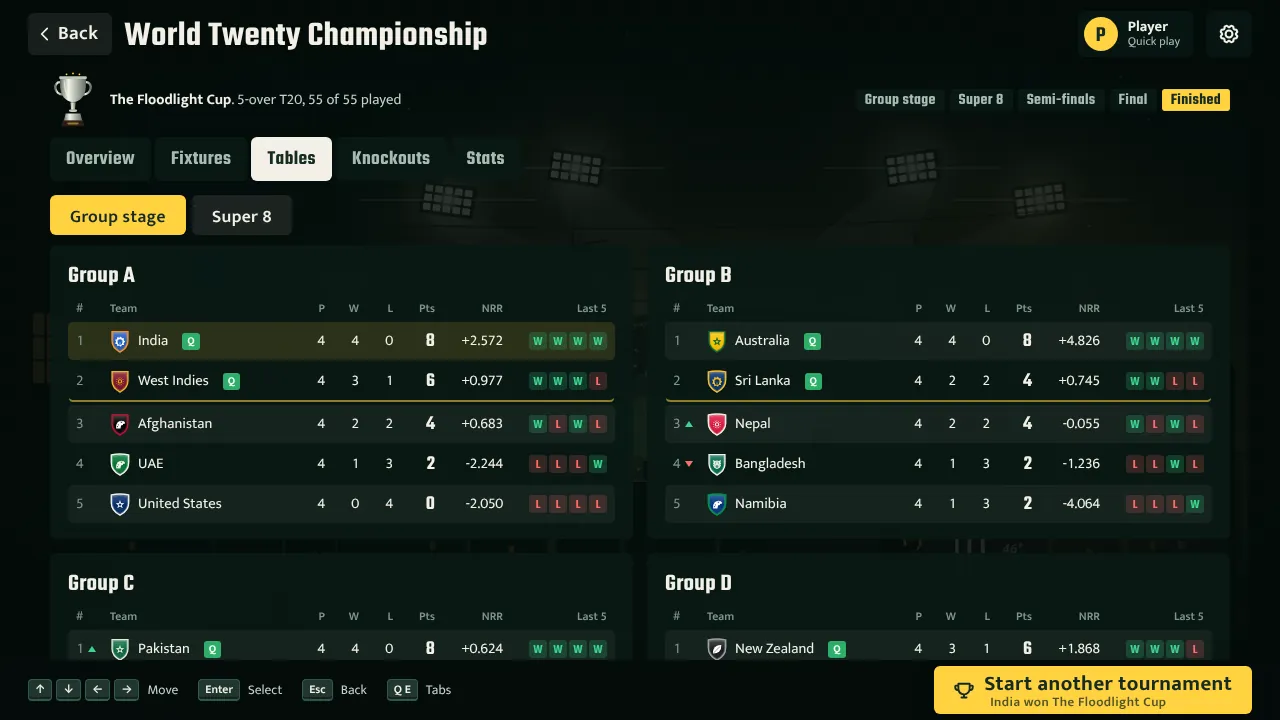
Choose Tournaments, pick a competition and your team, and play it through. There is a World Twenty with groups, a Super 8, semi-finals and a final, a World Fifty, a Champions Eight, each franchise league with playoffs, bilateral series of Tests, one-day internationals or T20s, and a custom tournament where you choose everything. Every competition except Tests can be played at 5, 10 or 20 overs, or at full length.
Play your own matches in 3D or let the game simulate them. Other matches are simulated as you watch, the tables update with net run rate, the bracket fills in, and there are leaders for runs, wickets, strike rate and economy, a player of the match for every game and awards at the end. Tournaments save as you go, and you can have several on the go at once.
How do I change the graphics, sound and controls?
Open Settings from the main menu, or press Esc in a match. Graphics come in four levels: Low for phones and older computers, Medium, High with soft shadows, floodlight glow and colour grading, and Ultra with the sharpest shadows and light shafts. Auto picks one for your device, and in a match the game lowers the resolution a little if it cannot keep up. Sound has separate levels for the crowd and the effects, the stump mic and the stadium DJ, and the commentary can be captions, a spoken voice, or both. You can also switch the build-up, the TV cameras between balls and the replays on or off, and reset the tips. On a phone, turn it sideways: the match waits until you do.
How do I start a career?
Choose Careers on the main menu, then New career, and answer five short steps: your path, your country, your state, your club and you. From a career, the menu button takes you back to the main menu whenever you like.
- Path. Choose Manager to run a team as head coach, or Player to play as one cricketer from club level upwards.
- Country. Twenty nations are in the game, from India, Australia and England to Nepal, the United States and Canada. Each has its own board, conditions and kind of talent.
- State. Your club plays in that state’s league. The state side picks the best club players each month.
- Club. Clubs are big clubs, mid-table sides or underdogs. A big club has money and pressure; an underdog has a thin squad, and beating the odds raises your reputation fastest.
- You. Name your manager or player and choose a look. Players also pick a role (batter, keeper, all-rounder, pace or spin), a batting hand and a bowling style.
Before you confirm the club, the game shows exactly what you are taking on: the board’s target, the budget, how many pre-season signings you get and what meeting the target is worth.
How does the calendar work?
Time moves forward one day at a time when you press Continue, the yellow button at the top of every screen. The game keeps going until something needs you: a match day, a squad to pick, an auction, a job offer or important news.
The button changes with the situation, so it always does the next useful thing. On the pre-match screen it reads Play the match. During a match it reads Next ball, Your shot or Your delivery, and after the last ball it reads Continue. On a page that is waiting for you, it takes you to the button you need.
A season has several competitions: the state one-day championship and a state T20 league for clubs, domestic and franchise leagues higher up, and tours, the Asia Cup and World Cups for national teams.
How do live matches work in a career?
On match day you see the pre-match screen with a pitch report, a head-to-head of both teams and the win chance. Set your batting approach and bowling plan, then choose Watch live to play ball by ball or Quick result to simulate the match in a moment.
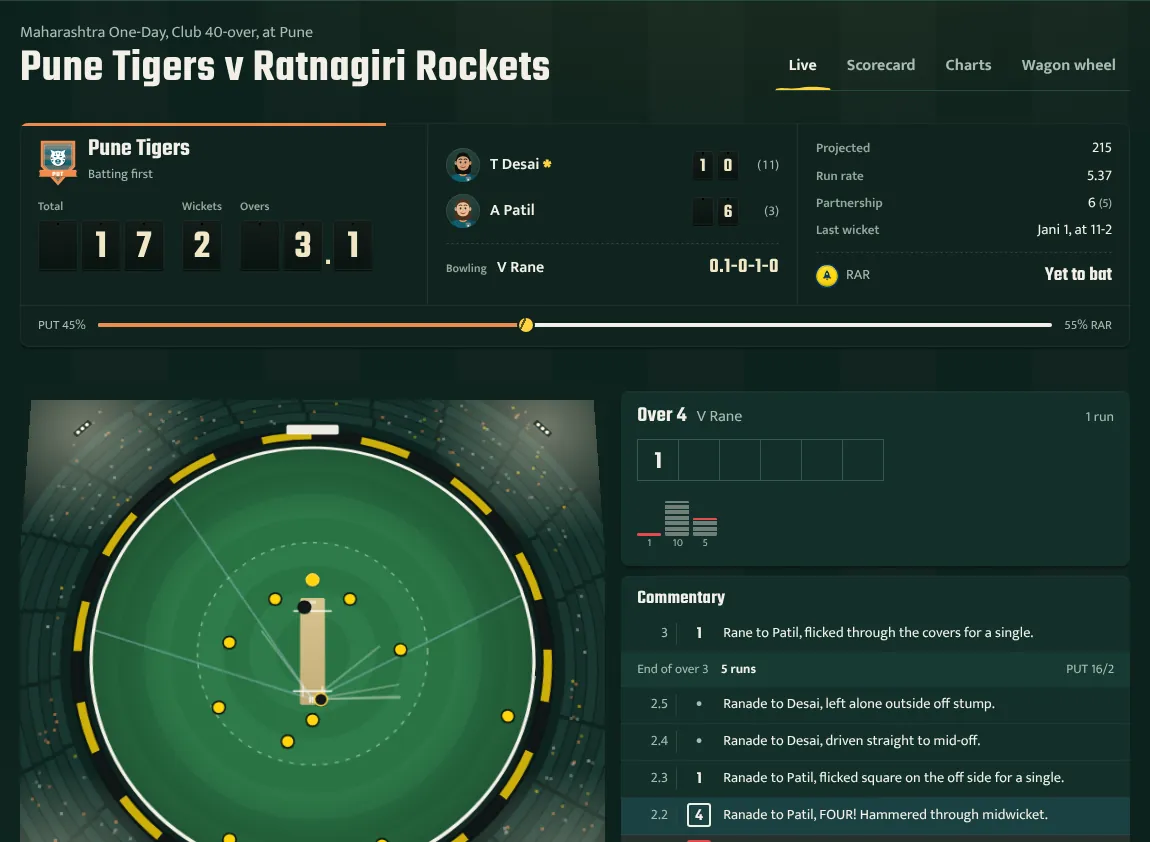
The screen has four parts:
- The scoreboard shows the total, wickets and overs on number plates, both batters with their runs and balls (the striker has a *), the bowler’s figures, what a chase needs and the win chance.
- The ground shows the field placings for the current plan and each delivery as it happens, with the last few scoring shots drawn in.
- The over is kept in scorer’s notation: a dot for a dot ball, a boxed 4, a filled 6, W for a wicket and + for a wide. The small bars below show runs in recent overs.
- The commentary lists every ball with its result. A ruled line marks the end of each over.
Use the control keys under the ground: Next ball, Next over, End of innings and To the finish. Switch on Auto-play and choose a speed to let the match run by itself. As a manager you can change the batting approach and bowling plan at any time, and pick who bowls the next over. The Scorecard, Charts and Wagon wheel tabs show the full picture.
In matches with the Decision Review System, the game asks whether you want to review an LBW or caught-behind decision. The ball-tracking or edge-detection replay then shows whether the umpire was right. See the rules in the game for how many reviews each format allows.
How do I choose a shot?
When you are on strike in player mode, the match stops and shows the delivery coming at you, then up to six shot cards chosen for that ball. You always get Leave it, Block it and a way to rotate the strike, plus the attacking shots that suit the length and line. Pick one by clicking it or pressing 1 to 6.
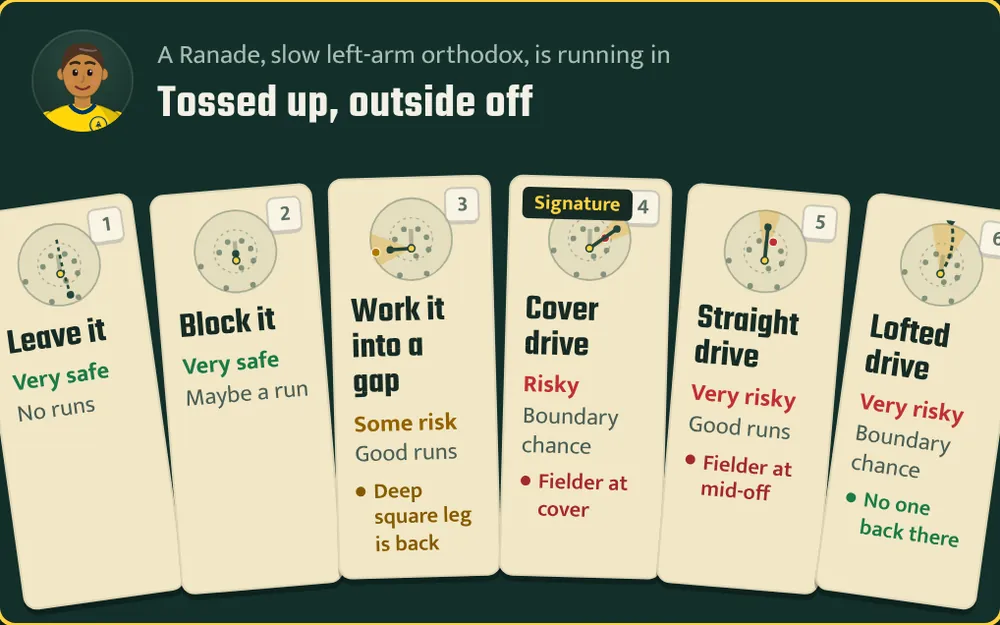
Every card has a small map of the ground: the dots are the fielders and the shaded wedge is where the shot goes. The note underneath reads the field for you. Into the gap and No one back there mean the area is open. Fielder at cover means a ground shot will be stopped. Long-off is on the rope means an aerial shot there could be caught. The field follows the bowling side’s plan, so an attacking field leaves gaps in the deep and a defensive one puts men on the boundary.
| Shot | When it works |
|---|---|
| Leave it | Wide outside off stump. Never leave a ball that is hitting the stumps. |
| Block it | Good balls on the stumps, and while you play yourself in. |
| Work it into a gap | Almost any ball. The game aims it at the biggest gap in the ring, so it is the safest way to rotate the strike. |
| Dab to third man | Good length and short balls outside off. Soft hands for a single. |
| Cover drive | Full balls and flighted spin outside off stump. |
| Straight drive | Full balls and flighted spin on the stumps. |
| Flick off the pads | Full and good length balls on the pads. |
| Square cut | Short and wide balls outside off stump. |
| Pull | Short balls from the quicks. It goes partly in the air. |
| Hook | Bouncers. In the air, fine on the leg side. |
| Sweep | Spin on a good length or tossed up. |
| Reverse sweep | Spin, when the off side behind square is open. Extra risk. |
| Lofted drive | Full balls and flighted spin, over the infield. |
| Slog sweep | Flighted spin, over midwicket. |
| Whip over midwicket | Full balls and yorkers on the stumps or pads. |
| Ramp over the keeper | Full balls and yorkers from the quicks when fine leg is up. The riskiest shot in the game. |
The risk on each card already accounts for the delivery, your skills and the field: a lofted drive at a yorker is very risky, the same shot at a full ball with long-off up much less so. Pick a signature shot on the Brand page and it is offered whenever it suits the ball, and you play it better: about 12% less risk and 12% more runs.
How does running between the wickets work?
When you work the ball into the outfield, the game may stop after the first run and ask for your call: No! Stay or Yes! Two. Press 1 to stay or 2 to run. The card shows the run-out risk, which depends on how deep the fielder is, how good the fielding side is and how fit you are.
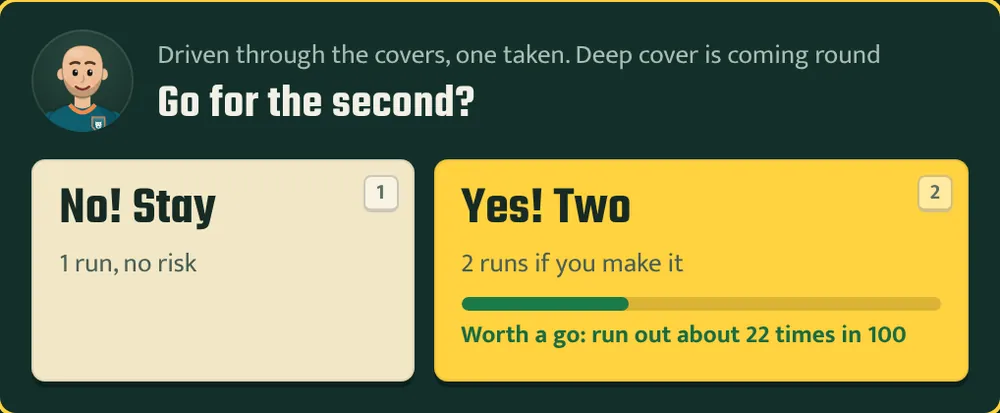
As a manager, the Running setting on the Tactics page and in the live match controls how hard the whole team runs. Safe takes only the clear runs and halves the run-out risk. Aggressive turns ones into twos and puts the fielders under pressure, with more run outs.
How do I choose a delivery?
When you bowl in player mode, a pitch map shows where each delivery lands, from yorker length at the batter’s feet to short of a length. Pick one from the list, from the numbered marker on the map, or with 1 to 6.
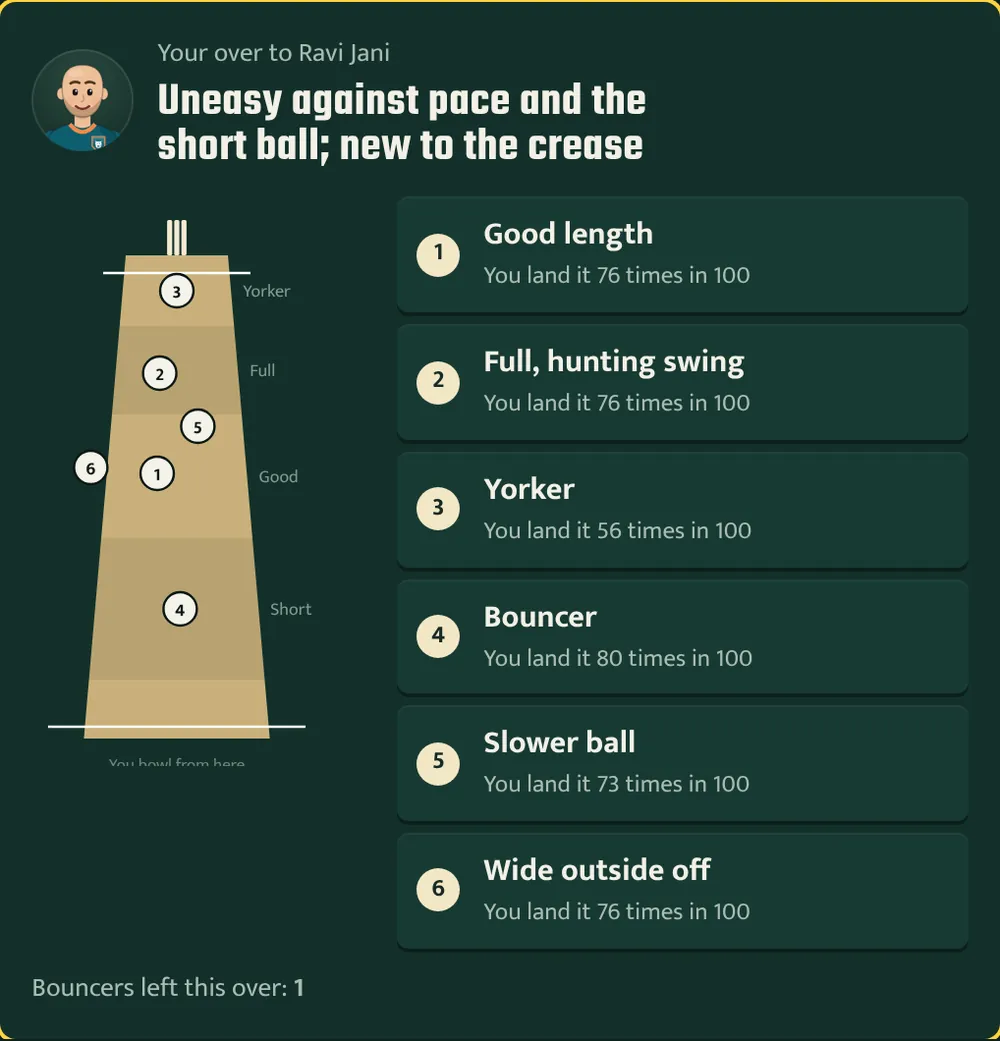
Pace bowlers choose from a good length ball, a full swinging ball, a yorker, a bouncer, a slower ball and a wide one outside off. Spinners can toss it up, bowl quicker and flatter, rip a big turner, dart it at the stumps or try a mystery ball. The list shows how often you land each delivery, which depends on your accuracy and variations. Bouncers are limited per over, and the game tells you how many you have left.
What are the keyboard shortcuts?
| Key | What it does in a live match |
|---|---|
| Space | Next ball |
| O | Next over |
| I | End of the innings |
| F | Play to the finish |
| A | Auto-play on or off |
| 1 to 6 | Pick a shot or delivery |
| 1 or 2 | Stay or run when the game asks for your call |
| M | Sound on or off |
How do I run a team as manager?
As head coach you pick the team, sign players, set tactics and training, and answer to the board. The full guide is on the manager mode page; these are the screens you will use most.
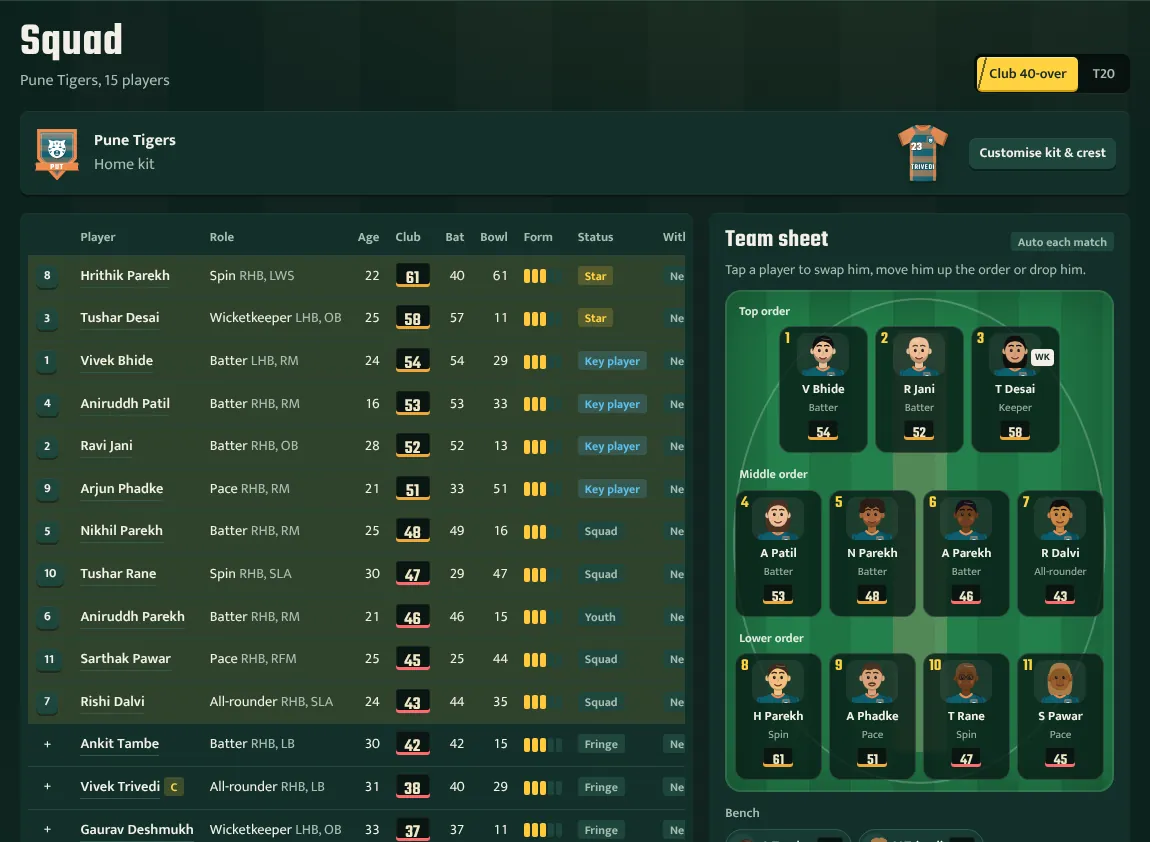
- Squad: the team sheet. Tap a player to swap him in, move him up the order or drop him, and choose a captain and keeper.
- Signings: before the season you can sign up to three players from a scouted shortlist of free agents and players at rival clubs.
- Tactics and Training: the batting approach, bowling plan and running, the team’s training focus and intensity, one-to-one coaching and specialist camps.
- Academy: build a youth academy, then promote the best teenagers into your squad.
- Board and Fans: your standing with the board out of 100, made up of results, the dressing room, the fans and the finances.
- Finances: the bank balance, the wage bill against the budget, and contracts to renew or release.
- Jobs and Career: your reputation, job vacancies, interviews and coaching badges.
How do I play a career as a player?
As a player you control one cricketer. You earn experience points (XP) in matches and spend them on training, push for selection and build a following. The full guide is on the player mode page.
- My Player: your ratings in each format, your potential, the training screen and your pathway to the state side, the T20 league draft and the national team.
- Selection race: where you stand in your club XI, the state squad and the national squad, how far you are from the cut, and what the selectors think of you.
- Brand and style: your nickname, shirt number, celebrations, bat and look, and sponsorship offers once you have a following.
What are press conferences and interviews?
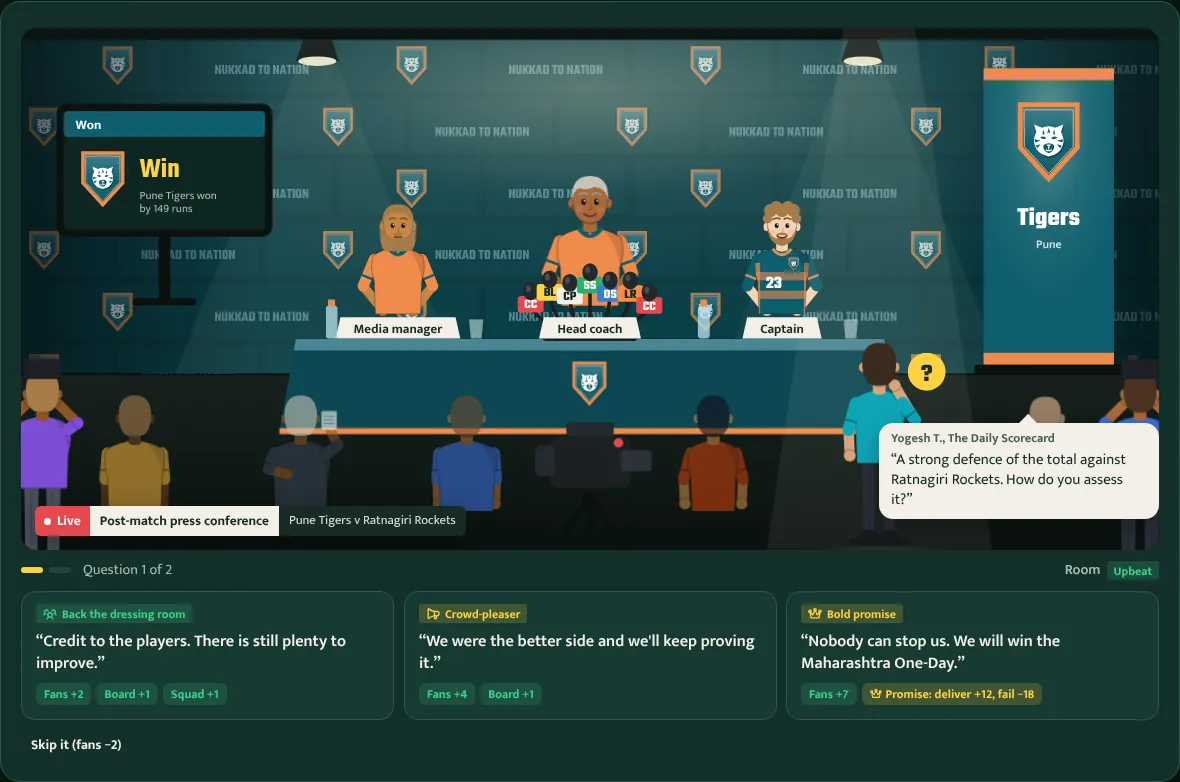
After matches, managers face the press and players give interviews. Each answer shows its effect before you choose it, for example on the fans, the board or the squad. Bold promises win fans straight away and are judged later: deliver and you get a bigger boost; fail and it costs one and a half times as much.
How do saves, settings and sound work?
The game saves automatically every time it stops. On the Save and account page you can also save to three slots, download a save file as a backup and import one on another device. If sign-in is available, signing in with Google keeps your saves online and puts you on the leaderboard. Read the privacy policy for what is stored.
The same page has your settings: the currency used for money, whether to show the toss scenes, the tips from Googly the mascot, and match sound. Sound can also be switched off during a match with the speaker key or M.
Once the game has loaded, it also works offline, so you can play a match without a connection.
Common questions
Is Nukkad to Nation free to play?
Yes. You play it in your browser with nothing to download or install, on a computer or a phone. Nothing in the game is for sale: Star XI coins are earned by playing.
Do I need to start a career to play a match?
No. Press Play now on the main menu and you are in a 3D match straight away. Quick matches, online games, Star XI and tournaments need no career at all.
How long is a season?
A season takes about 30 to 60 minutes if you watch your key matches live and simulate the rest. Simulating everything takes a few minutes.
Can I switch between manager and player mode?
Each career is one or the other. You can run a manager career and a player career side by side in different save slots.
Why did the game stop on its own?
The calendar stops for match days, squad selection, auctions, job offers and important news, so you never miss something that needs a decision. Press Continue to carry on.
Are the players and teams real?
No. All players, clubs, leagues and governing bodies in the game are fictional, generated for each new world.